ExactShot — Editable Screenshots for macOS
Capture screenshots you can clean up and adjust after the shot.
Remove distractions, move UI elements, and export layered PSD files.
A normal screenshot is a flat image.
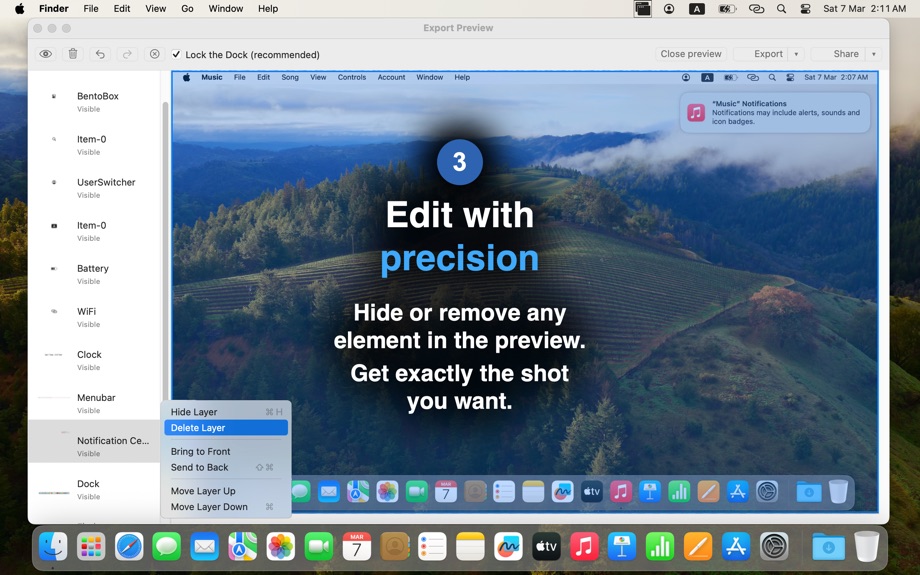
ExactShot captures the screen as a structured scene where interface elements remain editable.
This means after capturing you can:
• remove icons, extra windows, and unexpected notifications
• hide UI elements
• move objects inside the screenshot
• keep only what actually matters
The result is a clean, structured screenshot ready for documentation, presentations, articles, or design work.
Work with a screenshot like a scene
After capture, the screen doesn’t become a static image.
ExactShot opens a composer where you can:
• manage layers
• remove accidental elements
• move UI objects
• prepare a clean final frame
This eliminates the need to retake screenshots because of small distractions.
Export to editable formats
If you still want to adjust something later, you can.
ExactShot lets you export screenshots as:
• PNG
• JPEG
• PSD with preserved structure
PSD export allows you to remove or modify elements in professional editors without capturing the screen again.
Smart file names without templates
ExactShot doesn't force you to configure complex naming templates.
By default, file names are:
• unique
• include date and time
• sort correctly
• require no manual input
You can always change the name using the standard macOS save panel.
Thoughtful defaults
ExactShot ships with settings that work well for most workflows.
For example:
• the Dock layer is locked from accidental movement
• safe filename separators are enabled
• recommended selection modes are active
Everything can be changed quickly, but you can start working productively right away.
No accounts. No cloud.
ExactShot doesn’t require registration and doesn’t tie you to cloud storage.
You decide what to do with your screenshots:
• save locally
• share via AirDrop
• send through macOS sharing
• open in another app
All processing happens locally on your Mac.
Built for people who work with screenshots
ExactShot is designed for anyone who regularly works with screenshots:
• developers
• designers
• technical writers
• educators
• product teams
If you’re tired of retaking screenshots because of small mistakes — ExactShot solves that problem.